Nordlog GmbH
Problem
DE-ANR-4419 · DE → BE · 10.40 ldm · 20400 kg
Martin reports that the driver has been waiting three hours at dock 4 in Großbeeren because the warehouse says no loading slot is available.
Waiting for client (4d)
Turn fragmented transport emails and documents into source-backed timelines, and see what matters across your team.
We bring the transport scenario. You bring your questions.
Processed so far
TRUSTED BY



The TMS holds the plan. The reason behind the latest address, price, delay, or promise is still spread across inboxes and attachments. Answering “what happened?” means Inbox search plus asking a colleague.
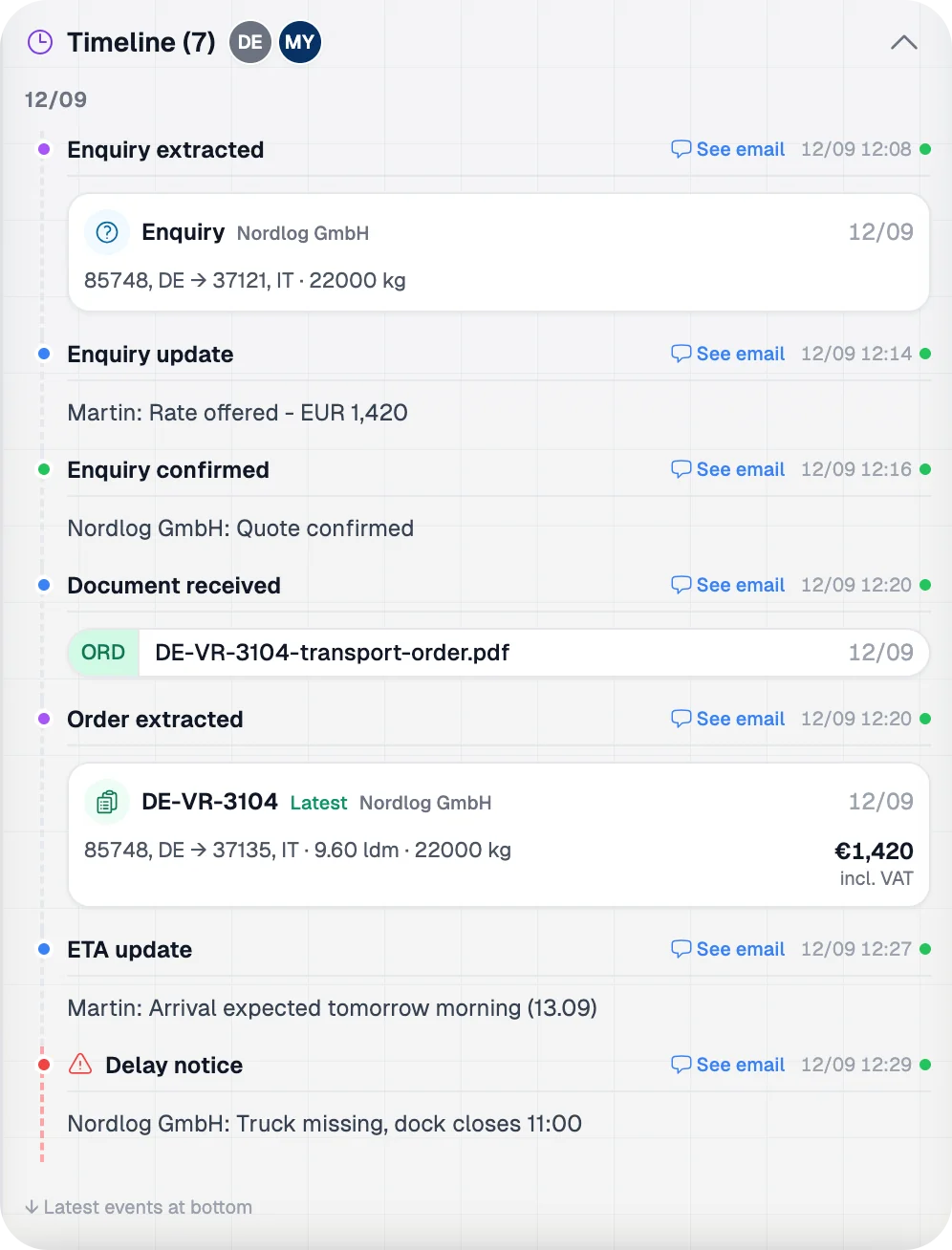
Medulla reconstructs that written history as one source-backed transport timeline.
Medulla shows what your company has documented. It does not claim to see every phone call or physical event on the road.
12/09
Enquiry extracted
85748, DE → 37121, IT · 22000 kg
Price agreed
Martin: Rate offered — EUR 1,420
Document received
DE-VR-3104-transport-order.pdf
12/09Order extracted
85748, DE → 37135, IT · 9.60 ldm · 22000 kg
€1,420
incl. VAT
Order updated
ChangedNordlog GmbH: Loading address changed to Dieselstraße 12, ramp 3
Delay reported
DelayNordlog GmbH: Truck missing, dock closes 11:00
Customer informed
Martin: Delay at loading passed to Nordlog
Waiting charge approved
Nordlog GmbH: EUR 180 waiting charge approved
↓ Latest events at bottom
The same person still handles loads and covers the desk.
Know your own transports. See what matters across the team.
When a customer calls, or a colleague is out, the answer is still in email. Search the transport, see what changed, and open the source before you respond.
Home
Transports
What's the Nordlog transport to Verona?
The Nordlog FTL to Verona is DE-VR-3104: 85748, DE → 37135, IT.
85748, DE → 37135, IT · 9.60 ldm · 22000 kg
€1,420
Give me the loading and delivery addresses
The delivery address was updated to Via Cà di David 8, dock 4, 37135 Verona.
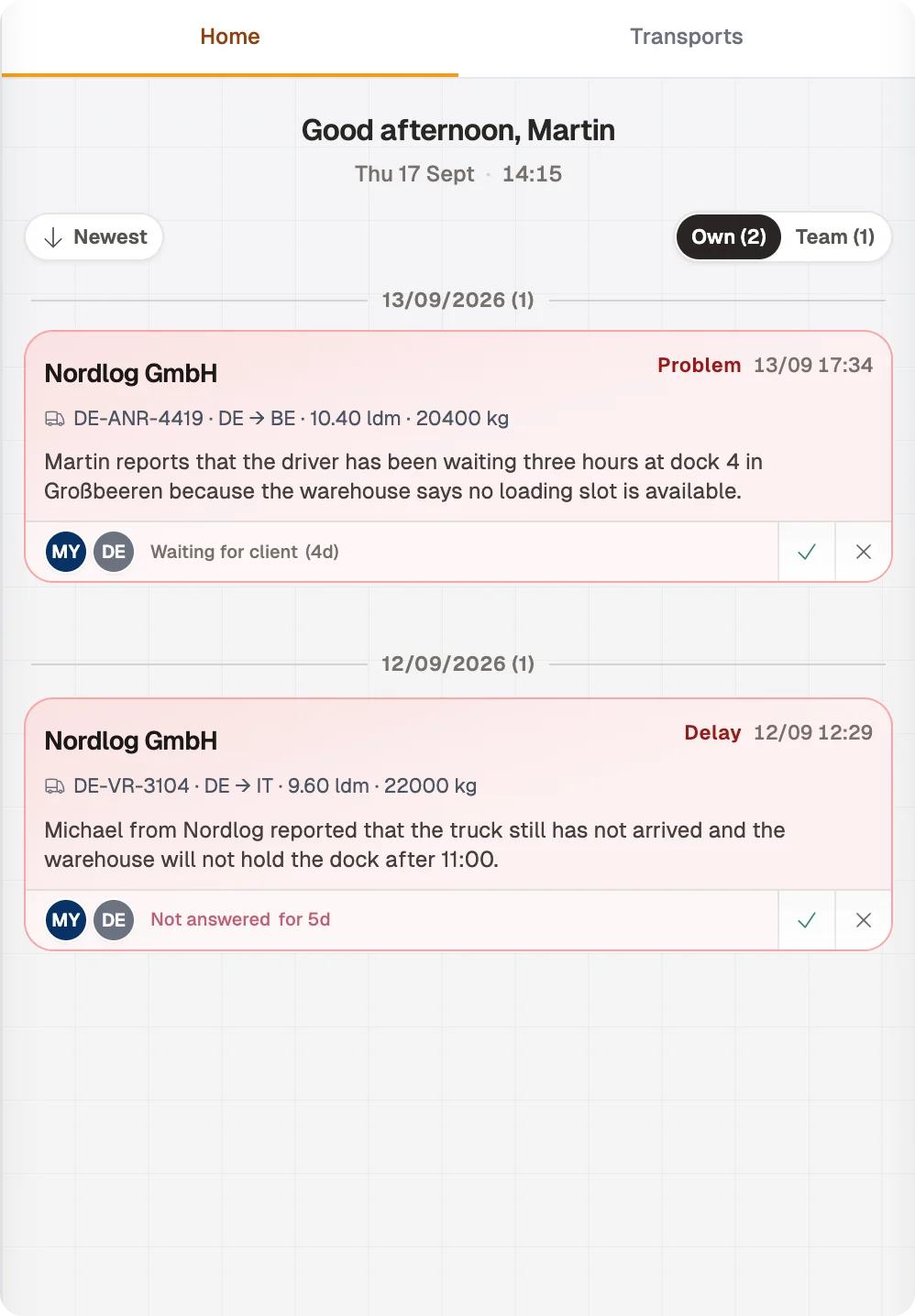
Urgent chases, delays, and problems often live in someone else’s mail. Home shows what the operation still owes on your threads and across the desk, without a verbal status round.
Home
Transports
Good afternoon, Martin
Thu 17 Sept · 14:15
13/09/2026 (1)
DE-ANR-4419 · DE → BE · 10.40 ldm · 20400 kg
Martin reports that the driver has been waiting three hours at dock 4 in Großbeeren because the warehouse says no loading slot is available.
Waiting for client (4d)
12/09/2026 (1)
DE-VR-3104 · DE → IT · 9.60 ldm · 22000 kg
Michael from Nordlog reported that the truck still has not arrived and the warehouse will not hold the dock after 11:00.
Not answered for 5d
Team Home depends on connected or forwarded team transport mail.
Inbox add-in
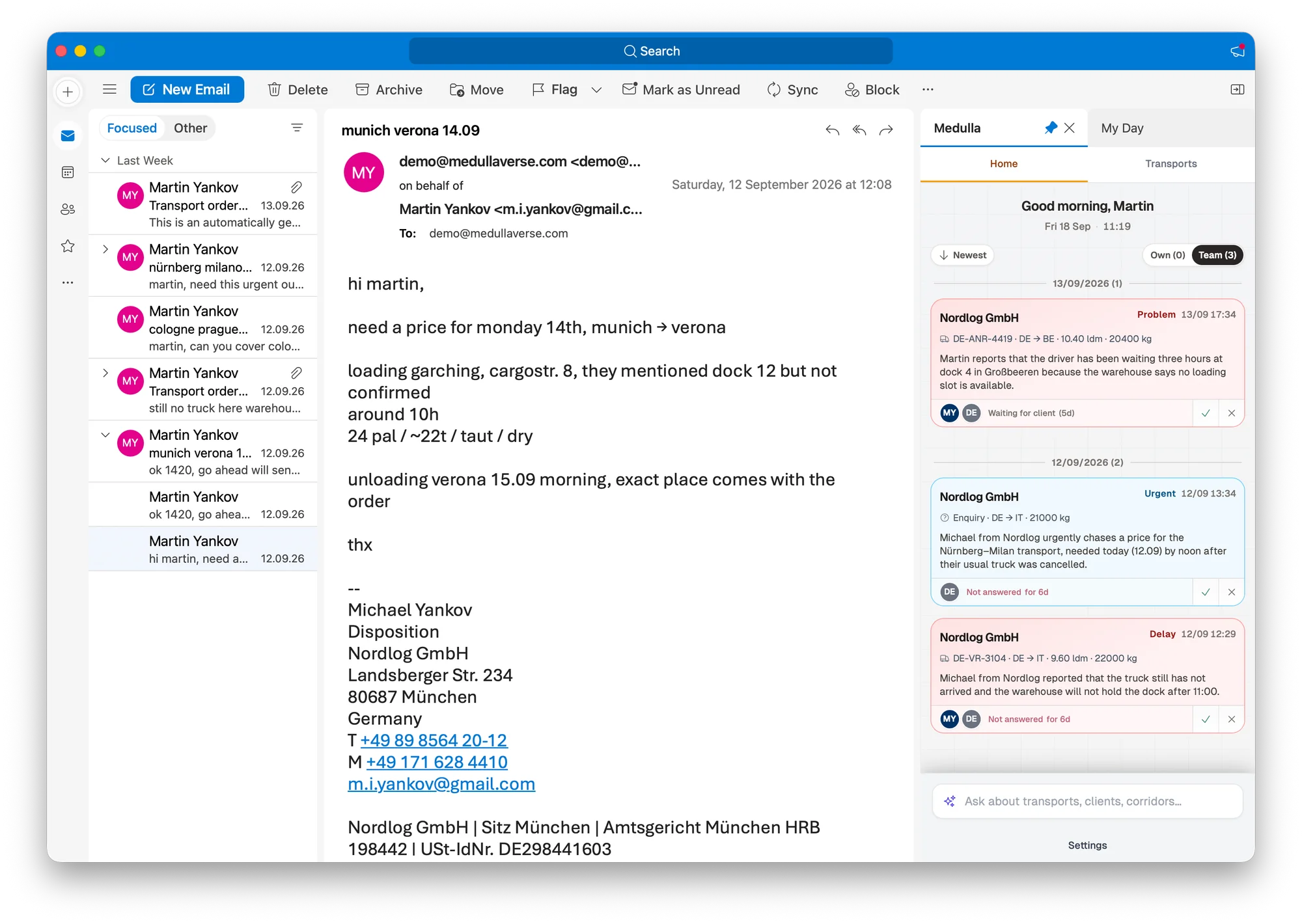
The team already reads and replies in email. Medulla puts Operations Home, transport search, and the Assistant beside the message, so daily work does not require a second portal.
Search a transport, see what needs attention, and open the source without leaving the thread.
Operations Home
See Urgent, Delay, and Problem cards next to the mail you are already reading.
Transport search
Find the load from the Inbox and open the documented timeline.
Assistant
Ask what changed, then check the source email or document.
Stay in the Inbox where the team already reads and replies.
Medulla is operational memory for transport companies. It preserves the written history behind each transport and makes it usable across the team.
Setup is simple. Add a forwarding rule, or forward mail as it arrives. You do not bring data upfront. No preparation is required. Results appear the same day.
Add a forwarding rule, or forward mail as it arrives. You do not upload a dataset or prepare files in advance. Once mail is flowing, results appear the same day.
Add a forwarding rule, or forward mail as it arrives. You do not upload a dataset or prepare files in advance. Once mail is flowing, results appear the same day.
We will walk through a prepared transport from scattered emails to one documented timeline, then show what appears on Home and how it works in the Inbox. You do not need to prepare or send us anything before the call.
See Medulla in actionA focused 20-minute session covering Timeline, Home, and Inbox.